 RapidRAW
Tone & Color

All tools on this page run in one GPU compute shader (shaders/shader.wgsl). Slider values are converted to shader values in image_processing.rs. "Linear" means scene-linear RGB with Rec.709 primaries; "display" means the 0 to 1 values after the tone mapper.
Luminance is always Rec.709 luma: Y = 0.2126·R + 0.7152·G + 0.0722·B.
Order of operations
The shader always runs the steps in the same order, whatever order you moved the sliders in.
Show all 27 steps
| # | Step | Works in |
|---|---|---|
| 1 | Chromatic aberration correction | input |
| 2 | Convert non-RAW input to linear | linear |
| 3 | Add up mask values | |
| 4 | Noise reduction | square-root luma |
| 5 | Sharpening | square-root luma |
| 6 | Clarity, Structure, Centré clarity | log2 luma |
| 7 | Dehaze | linear |
| 8 | Exposure | linear |
| 9 | Glow, Halation, Flares | linear |
| 10 | White balance | Bradford LMS |
| 11 | Centré exposure and color | linear |
| 12 | Whites, Shadows, Blacks, Contrast | gamma 2.2 luma |
| 13 | Highlights | linear luma |
| 14 | Color calibration | linear |
| 15 | HSL mixer | HSV of sRGB values |
| 16 | Hue | HSV of sRGB values |
| 17 | Saturation, Vibrance | linear |
| 18 | Color grading (global, then each mask) | linear |
| 19 | Vignette | linear |
| 20 | Tone mapper (Basic or AgX) | linear to display |
| 21 | Built-in film emulation | V-Log to display |
| 22 | Brightness | display |
| 23 | Curves (global, then each mask) | display |
| 24 | Custom LUT | display |
| 25 | Grain | display |
| 26 | Clipping warning overlay | display |
| 27 | Dither and output | display |
Steps 4 to 9 are covered in Detail & Effects.
A few things follow from this order:
- Exposure comes before the tone mapper, so pushing it never clips hard with AgX; Brightness comes after, so it reshapes midtones without touching black and white.
- Color grading and vignette work on scene-linear light, so the tone mapper rolls them off naturally.
- Curves always see the finished, tone-mapped image.
Exposure
rgb = rgb · 2^(slider / 0.8)
The slider goes from −5 to +5, which is ±6.25 EV. It is a pure multiplication in linear light, exactly like changing the shutter speed. Baseline Exposure and highlight-preservation compensation (see RAW Processing) are added on top.

White balance
White balance is a von Kries adaptation in Bradford LMS space, the same method used to convert between illuminants in color management:
gains = LMS(as-shot white) / LMS(target white)
rgb'  = LMS→RGB · ( gains · RGB→LMS · rgb ) / luma(adapted white)
- Dividing by the luma of the adapted white keeps overall brightness constant when you change the temperature.
- Temperature and tint are converted to a chromaticity with Robertson's method (31 isotherms). Tint moves perpendicular to the Planckian locus.
- In relative mode, one unit of Temperature is 1.5 mired and one unit of Tint is 1.5 tint units, so ±100 is ±150 mired. Mired steps are perceptually even: the same slider move looks similar whether the photo was shot at 3000 K or 7000 K.
- Kelvin mode covers 2,000 to 50,000 K and tint ±150.
- In masks, white balance is a relative shift added in log-gain space.

Whites, Shadows and Blacks
These three work on the luminance of an edge-aware base layer and then put the local detail back, so they change tones without flattening texture. The base comes from guided filters on log2 luminance (radius 10 for the tonal base and 40 for the broad base, measured at a 1080 px short side), computed once per photo.
Shadows and Blacks lift or lower the tone curve with two curves that peak at different places, in gamma 2.2 (t = Y^(1/2.2)):
shadow_lift = (slider/120) · t · (1 − t)^4.5
black_lift  = (slider/40)  · t · (1 − t)^12
The (1 − t)^12 term makes Blacks act much closer to black than Shadows. Positive values also stretch contrast around a pivot of 0.2, and add back local detail so lifted shadows don't look flat. Detail is not boosted in near-black areas, so noise isn't amplified. Brightened shadows are desaturated very slightly (up to 12%).
Whites works on the broad base above a pivot of 0.4 (gamma 2.2). Positive values push the upper tones up with a soft shoulder; negative values compress them with a rational curve. Because it moves the base and keeps detail ratios, highlight texture survives.
Highlights has its own section below because it's a separate step: it runs after these three and Contrast, on linear luminance instead of gamma 2.2, with its own recovery for blown areas.

Contrast
A per-channel S-curve in gamma 2.2 with the pivot at 0.5 (about 0.218 linear, so slightly above middle grey):
p = rgb^(1/2.2)
s = 2^(1.25 · slider/100)                         0.42 to 2.38
p' = 0.5·(2p)^s              if p < 0.5
p' = 1 − 0.5·(2(1 − p))^s    otherwise
Because it works per channel, more contrast also increases saturation a little, like a film curve. Linear values above 1.0 are left alone, so the tone mapper can still compress them.

Highlights
Highlights compresses or expands tones above a low pivot (luma 0.06), blended in between 0.06 and 0.28, on the tonal base:
- Negative (recovery):
compressed = d / (1 + 2.2k · d / (1 + 0.35d)), a rational shoulder that compresses very bright (above 1.0) areas strongly while mid highlights move less. Local and mid-scale detail are boosted a little, so cloud texture comes back instead of turning flat grey. - Positive: brightens the upper tones with a curve that eases off for very bright values.
- Blown areas: with recovery, pixels above 1.0 are pulled toward neutral (up to 40%), so areas with no color information left turn white instead of a flat, saturated blob.
The result is applied as a luminance ratio, so hues don't shift.

Highlights vs. Exposure vs. Whites. Exposure scales everything. Highlights works on the bright part of the radius-10 base and keeps texture. Whites works on the broader radius-40 base and mostly sets where the brightest tones end up.
The Basic sliders on the histogram
The charts below follow a neutral tone through the steps above and then through the Basic tone mapper (RAW). The x axis is where the tone sits in the histogram before the change, so you can read off which part of the histogram a slider moves. They're computed from the shader formulas on a flat area (no local detail). A grey ramp rendered through RapidRAW matches them to within one 8-bit level.

The Basic adjustments page shows the same data as one overview chart.
Saturation and Vibrance
rgb = mix(Y, rgb, (1 + saturation) · (1 + vibrance_factor))
- Saturation scales chroma evenly while keeping luma.
- Positive Vibrance works mainly on low-saturation colors (
(1 − S)^1.25) and is halved around orange skin hues (about 25°), so faces don't turn orange. - Negative Vibrance reduces the most saturated colors first. Colors below 5% saturation are left alone.


HSL mixer
Hue and saturation are read from the HSV of the sRGB-encoded color; luminance is measured as linear luma. There are eight bands:
| Band | Center | Width |
|---|---|---|
| Red | 358° | 35° |
| Orange | 25° | 45° |
| Yellow | 60° | 40° |
| Green | 115° | 90° |
| Aqua | 180° | 60° |
| Blue | 225° | 60° |
| Purple | 280° | 55° |
| Magenta | 330° | 50° |
- Each band's weight is a Gaussian of the hue distance, and the weights are normalized to add up to 1. So there are no gaps between bands, and two neighbouring bands never double up.
- Hue sliders shift by up to ±60°. Saturation multiplies saturation. Luminance scales luma, and the hue and saturation changes keep luma constant.
- Near-grey pixels are protected: hue and saturation changes fade in between 5% and 20% saturation, so neutral areas don't pick up color.

Color calibration
Global only. The hue sliders rotate the camera primaries toward their neighbours (up to 25%), as in a 3x3 primary mixing matrix:
| Primary | Positive values | Negative values |
|---|---|---|
| Red | toward green | toward blue |
| Green | toward blue | toward red |
| Blue | toward red | toward green |
The saturation sliders scale chroma weighted by how much each primary contributes to the pixel. Shadows Tint adds up to ±6.25% magenta or green below luma 0.3.
Color grading
Color grading adds a color offset in linear light to three tonal zones:
shadow edge    = 0.1 + max(0, −balance)·0.5
highlight edge = 0.5 − max(0,  balance)·0.5
feather        = 0.2 · blending
Shadows, midtones and highlights masks are smooth steps around these edges; midtones is whatever is left. Each zone adds (color − 0.5) · saturation and a luminance offset, with zone strengths of 0.1 / 0.6 / 0.8 for color and 0.5 / 0.8 / 1.0 for luminance (shadows / midtones / highlights). Global applies everywhere at full strength.
- Negative balance extends the shadow zone upward; positive extends the highlight zone downward.
- Because the offsets are added in linear light before the tone mapper, a strong shadow tint stays subtle in deep blacks and builds up smoothly.

Vignette
uv = (position − center) · 2,  shaped by |uv|^(1 − roundness)
m  = smoothstep(midpoint − feather/2, midpoint + feather/2, distance)
negative amount:  rgb · (1 + amount·m)          darkens
positive amount:  mix(rgb, white, amount·m)     fades to white
With roundness 0 the shape is a circle (corrected for the aspect ratio). It's applied in linear light before tone mapping, which makes the falloff look like natural lens vignetting.

Tone mappers
The tone mapper converts scene-linear light (which can be far above 1.0) into display values.
Basic (default for new edits)
- RAW:
sRGB encode → ^(1/1.1) → 75% smoothstep S-curve. Middle grey (0.18) lands at 0.49. Anything at or above 1.0 is clipped per channel. - Non-RAW: just the sRGB encoding, so an unedited JPEG looks exactly like the original.
AgX (based on Troy Sobotka's AgX)
- Negative values are removed by an offset.
- An "inset" matrix moves the colors toward the white point in a Rec.2020-based space, with a small rotation of each primary.
- Each channel is encoded as log2 from −15.2 to +5 EV around middle grey.
- A sigmoid curve is applied, then a 2.4 gamma.
- An "outset" matrix restores most of the saturation.
| Scene value | AgX display value |
|---|---|
| 0.001 | 0.00 |
| 0.18 (middle grey) | 0.51 |
| 0.5 | 0.75 |
| 1.0 | 0.92 |
| about 1.40 | 1.00 |
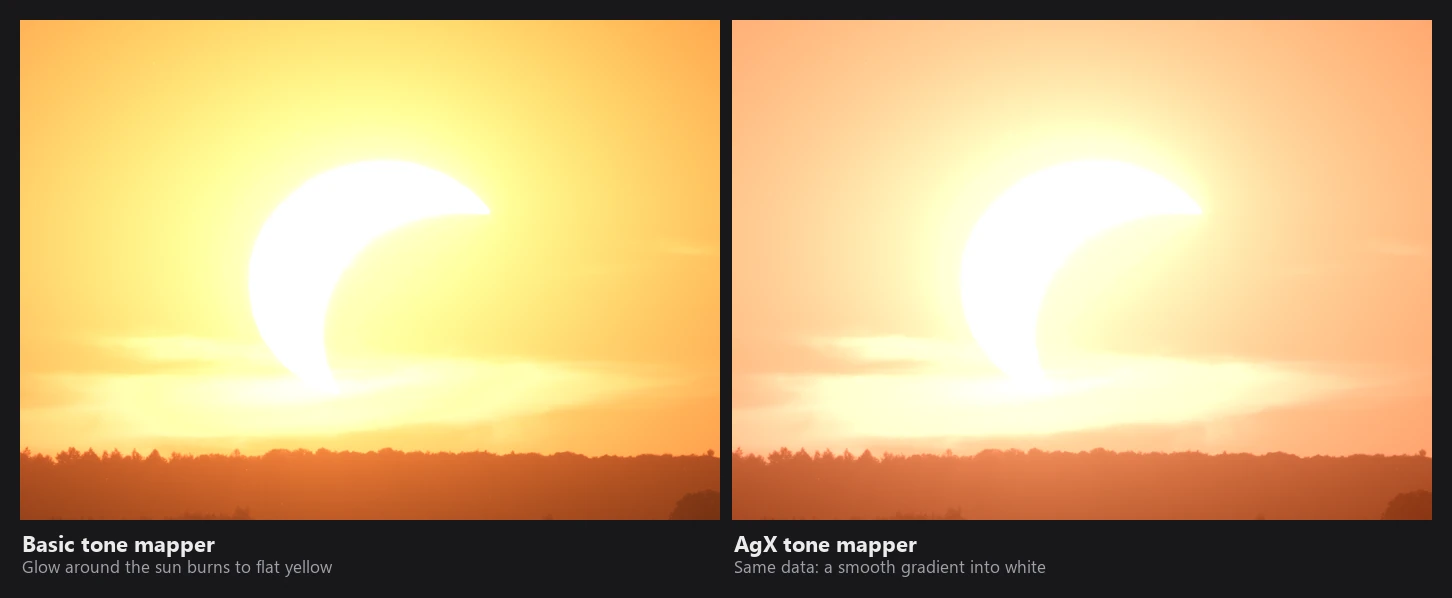
AgX has about half a stop of headroom above 1.0 and rolls very bright colors toward white instead of skewing their hue (a blown orange sky stays orange-white instead of turning flat yellow).

Film emulation
The built-in film looks are scene-referred 3D LUTs:
- The linear image (before tone mapping) is encoded with Panasonic V-Log (0.18 lands at 0.423).
- The LUT is sampled with tetrahedral interpolation (the cube is split into six tetrahedra; smoother than trilinear, no hue shifts along the grey axis).
- The result is mixed with the tone-mapped image by the LUT intensity. At 100% the film LUT replaces the tone mapper completely.
Your own LUTs (.cube, .3dl, HALD images) are treated as display-referred: they're applied after Curves, to the finished image.

Brightness
Brightness runs after the tone mapper, on display values. It uses a rational curve that keeps 0 and 1 fixed:
k  = 2^(−1.2 · slider/0.8)
Y' = Y / (Y + (1 − Y)·k)
Chroma is scaled a bit less than luma and is reduced near white, so brightening doesn't produce oversaturated highlights.
Curves
- Points are in 0 to 255 display values, at most 16 per channel.
- Interpolation is a monotone cubic (Fritsch–Carlson). A curve that goes up between two points never dips in between, so there's no overshoot or banding from wiggly curves.
- The Luma curve is a master curve applied to R, G and B separately (like "RGB" in other editors), so it also affects saturation. Then the R, G and B curves are applied.
- Curves that are a straight line are skipped.
Grain
Two octaves of gradient (Perlin-style) noise, mixed by Roughness, added equally to R, G and B (monochrome grain). Its size scales with the image, so grain looks the same in the preview and the export. It fades out in pure blacks and whites.
Clipping warnings and output
- The clipping overlay marks any channel above 0.998 red and below 0.002 blue, on the final display values.
- 8-bit output gets ±½ step of dither noise against banding. 16-bit TIFF exports are written without dither from 16-bit float data.
Slider scaling
How UI values map to shader values:
| Slider | UI range | Shader value |
|---|---|---|
| Exposure, Brightness | −5 to 5 | ÷0.8 (±6.25) |
| Contrast, Saturation, Vibrance, Dehaze | ±100 | ÷100 |
| Highlights, Shadows | ±100 | ÷120 |
| Whites, Blacks | ±100 | ÷40 |
| Clarity, Structure | ±100 | ÷125 |
| Temperature, Tint (relative) | ±100 | 1.5 mired per unit |
| Sharpness | ±100 | ÷50 |
| HSL hue | ±100 | up to ±60° |
| HSL saturation, luminance | ±100 | ÷100 |
| Color grading saturation, luminance | 0 to 100, ±100 | ÷500 |
| Color grading balance | ±100 | ÷200 |
| Calibration hue / saturation | ±100 | ÷400 / ÷120 |
| Vignette amount, midpoint, roundness, feather | ÷100 | |
| Grain amount / size | 0 to 100 | ÷400 / ÷50 |
| Chromatic aberration | ±100 | ÷10000 (±1% scale of red or blue) |
Masks
Most adjustments inside a mask are added to the global value before the operation runs:
value at pixel = global + Σ (mask value × mask influence)
So a mask at 50% influence with Exposure +1 gives exactly +0.5 EV, not a 50% blend of two images, and overlapping masks add up. White balance adds in log-gain space. Color grading and curves are different: each mask's grade or curve is blended over the result (mix(rgb, curve(rgb), influence)), one mask after the other.
Global only: tone mapper, LUTs, vignette, grain, color calibration, chromatic aberration and Centré. Up to 32 masks are used.